

Amazon PPC Dayparting is the strategy of scheduling your ads to run only during specific times of the day or days of the week, rather than continuously. This page breaks down the concept of amazon dayparting and walks you through a framework to create world-class amazon dayparting schedules.
Trusted by














_1731406732259_1731584606132.webp)


Where Amazon PPC Dayparting Can Be Applied
- Campaign level: Adjust overall budget & placement pacing
- Targeting level: Control based on ASIN/keyword
- Match type level: Focus only on Exact Match
- Placement level: Different behavior at TOS, PP, ROS
What You Can Change with Amazon PPC Dayparting
- Increase or decrease campaign budgets by % or value
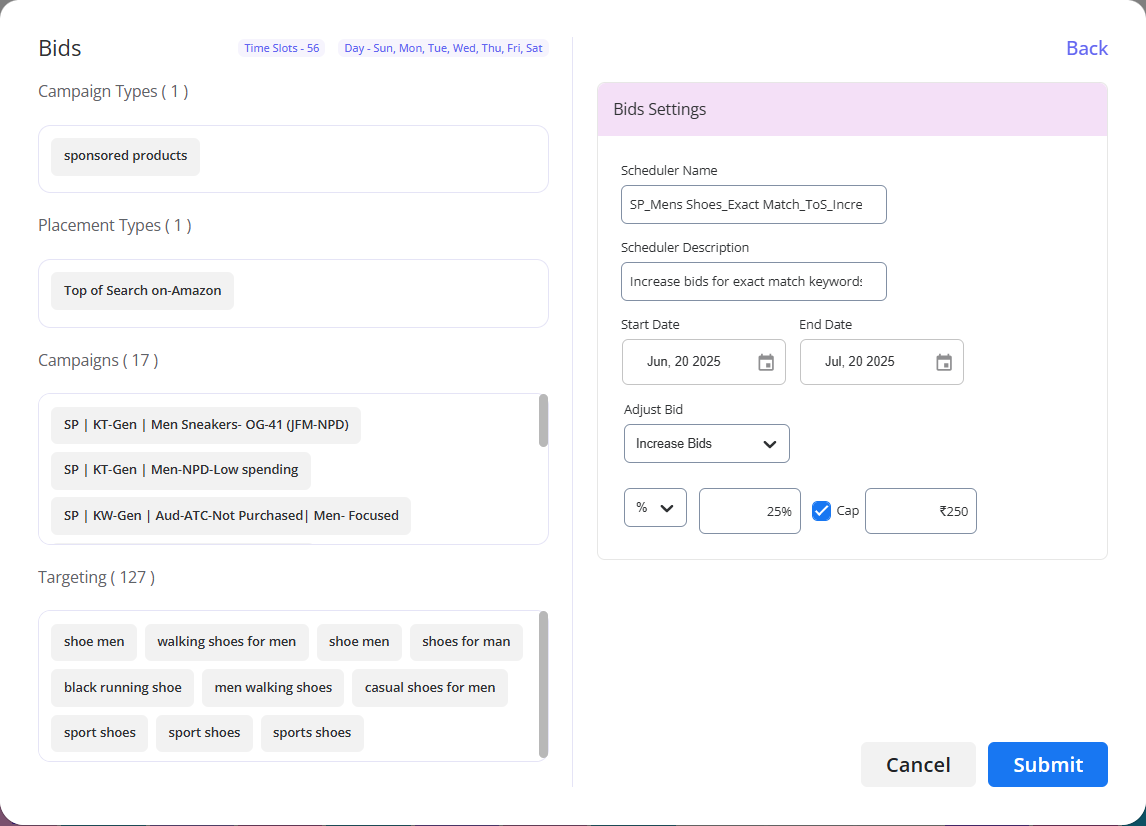
- Increase or decrease bids by % or value
- Increase or decrease placement modifiers by %
- Schedule rules with upper/lower limits while applying increase or decrease in budget, bids and placement modifiers
- Do all this based on actual performance data
Note: The changes are reverted to the original levels once the selected hour/s are over.
Amazon PPC Dayparting Framework
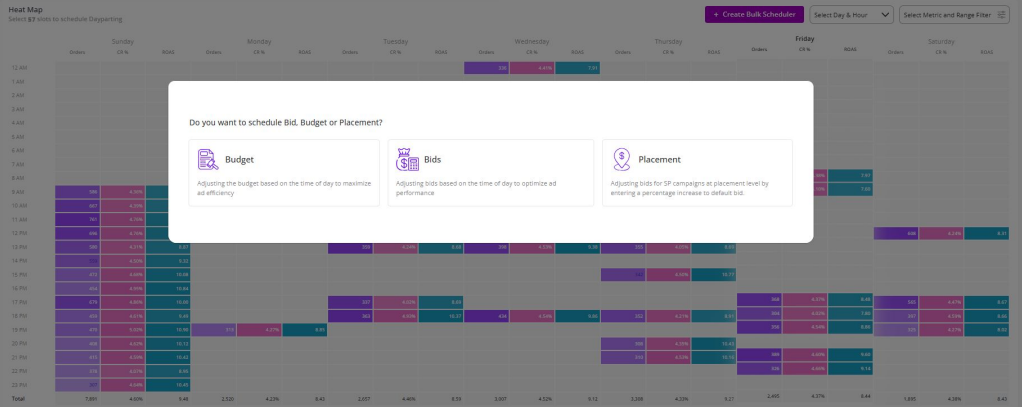
Step 1: Filter
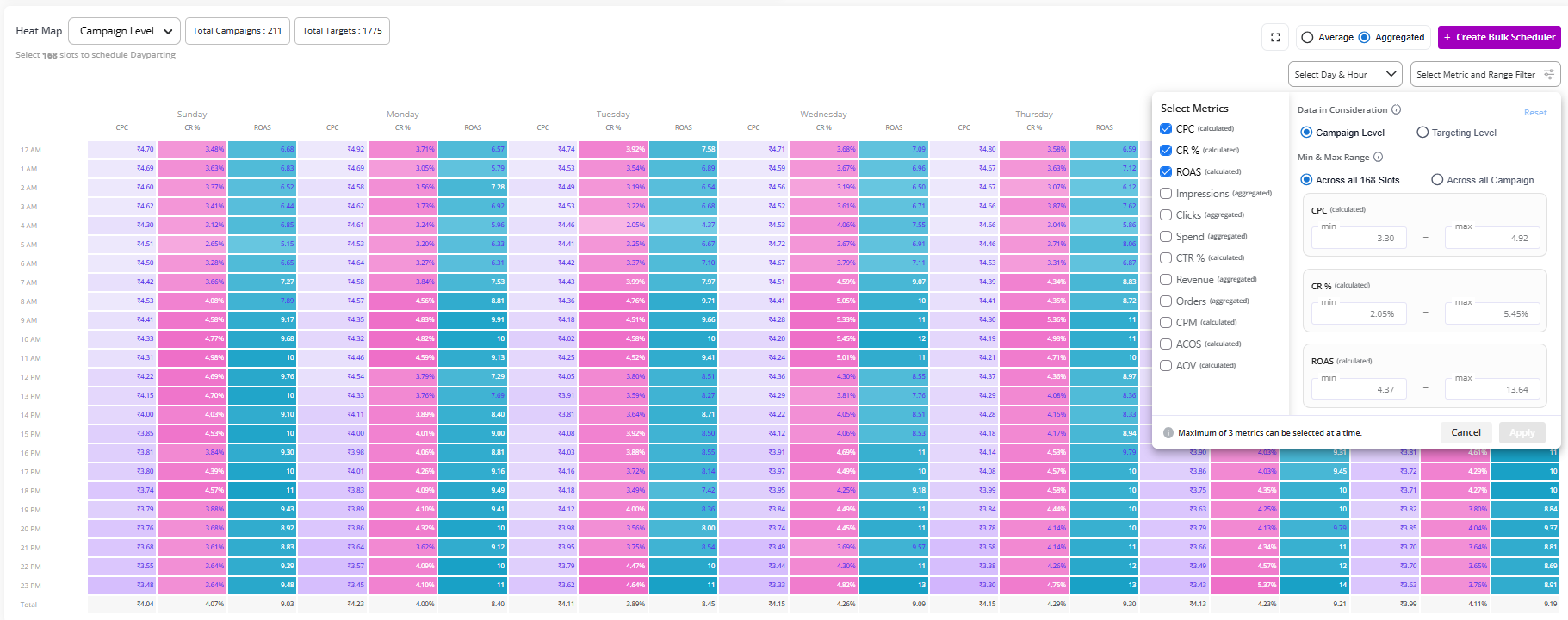
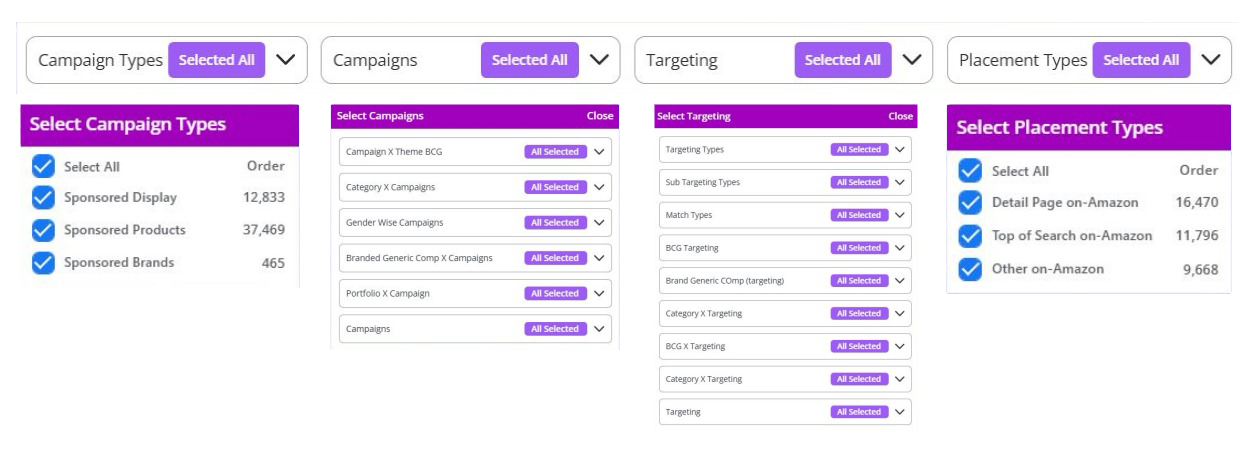
- Select campaigns, targeting, keywords or placements to see the data across 168 hourly slots
- Always use 60–90 days data
Step 2: Analyse
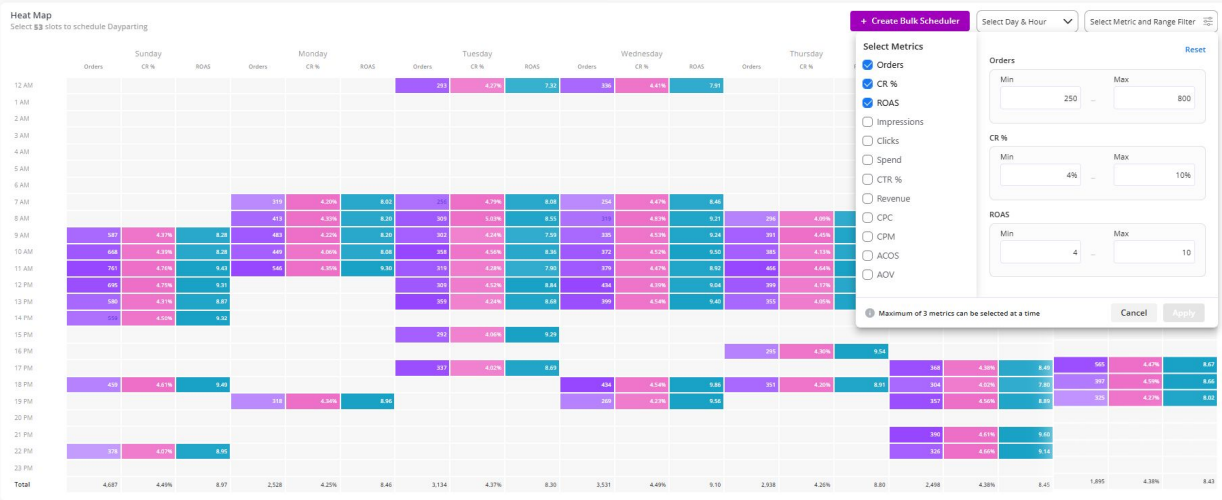
- Evaluate at least 2–3 metrics – ROAS, CR% & Orders recommended
- Set min / max filters to arrive at the desirable hourly performance
- Spot top / worst hours across campaigns, keywords & placements
Step 3.1: Action
- Create schedule/s: increase or decrease bids, budgets, and placement modifier as per the applied filters
- Remember: Never pause campaigns
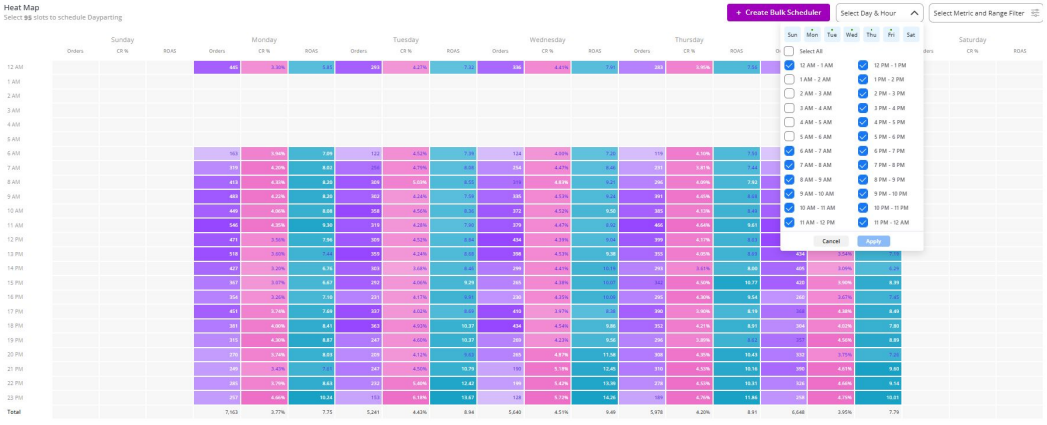
Step 3.2: Action
- Create schedule/s according to the hours of the day or days of the week
- Remember: Never pause campaigns
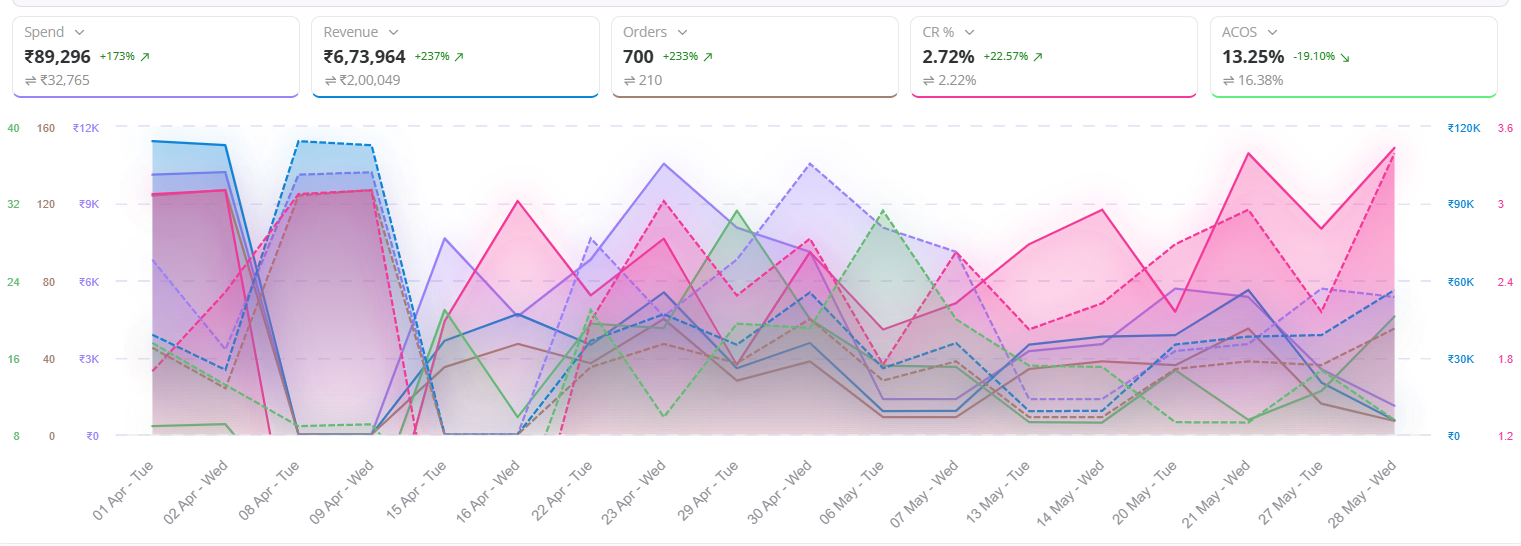
Step 4: Review
- Always evaluate schedule performance by comparing pre/post KPIs
- Focus on ROAS, Orders, CPC & CR% for the same hourly slots
Step 5: Repeat
- If ROAS, Orders, and CR% improve, keep scaling
- Apply learnings to similar targets or new campaigns
- Build a feedback loop: Track → Learn → Adjust → Scale
Do's and Don'ts of Amazon PPC Dayparting
| DO’s | DON’Ts |
|---|---|
| Segment Brand vs Non-Brand vs Competitor keywords | Use a single metric to judge hourly performance |
| Judge performance only on Exact Match | Mix placements while analyzing performance |
| Separate Event vs BAU performance | Trust Phrase/Broad match analysis |
| Use at least 60–90 days of data | Analyze performance only at campaign level |
| Review schedules periodically | Skip performance validation |
How Hector Makes Amazon PPC Dayparting Easier
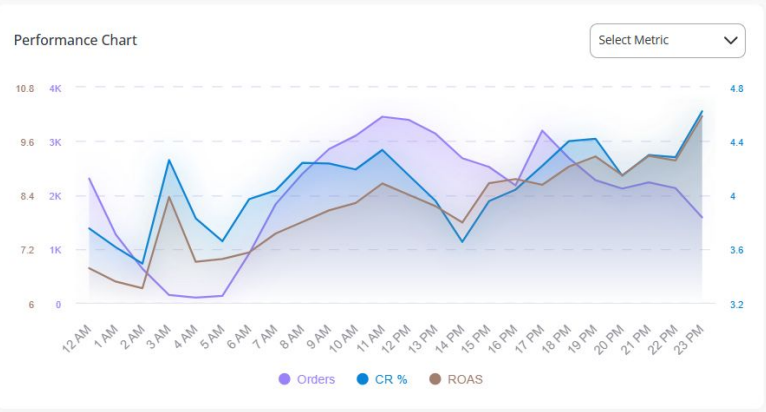
- Amazon Ad platform provides all key amazon dayparting decision data in a single screen
- Filter by match type, placement, campaign group, or keyword type
- See CR%, ROAS, and Orders side-by-side
- Select at least 3 metrics to find high/low performing time slots
- Set min–max filters to the selected metrics as per your goals
- Create schedules at:
- Campaign level
- Targeting level
- Match type level
- Placement level
- Set floor & cap limits to the decrease & increase actions
- Compare past and present performance seamlessly
The Hector Advantages
| Hector | Other Tools |
|---|---|
| All key amazon dayparting insights in one unified screen | amazon dayparting data spread across multiple views |
| Analyze and schedule using 3 metrics at once | Limited to one metric at a time |
| Drill down by match type, placement or keyword | Limited campaign-level visibility |
| Create schedules at category or product group level | No support for granular scheduling |
| Set min-max limits for performance control | No min-max or threshold control |
FAQs
Amazon Dayparting is a PPC technique whereby you schedule your Amazon ads to run only in selected hours or days when conversions are possibly to happen. Instead of 24/7, you will concentrate your budget in those time slots that often provide the best returns.
No, Amazon PPC Dayparting is important. While Amazon does automate the process of bidding, it does not stop ads from running during hours of poor performance. Dayparting puts the control in the hands of the advertisers to not waste ad spend for hours when shoppers are less likely to convert.
Amazon PPC Dayparting helps in optimizing ad spends by shifting them towards hours when buying intent peaks. This often equates to better click-through rates, higher conversion rates, as well as reduced wasted spend over low-intent hours.
Not always. Without Amazon Dayparting, your ads can still run over a poor-performing time of day, which negatively affects ACOS. Dayparting will allow finer tuning for campaign efficiency, especially on competitive or budget-sensitive accounts.
It is a particular fit for Amazon Dayparting when the seller has ample data, great traffic consistency, plus a constrained budget. For new sellers with low data, immediate results might not be witnessed, but for established sellers, marked improvements in performance arise.